Just as soon as you get a handle on Google, they switch things up. I have been advising my clients that Google’s Core Web Vitals is a concept you need to understand if you are concerned about your page ranking. If you don’t speak geek, let me translate.
Every so often–at least a few times a year–Google introduces big new changes to their algorithm. Sometimes they announce them, and sometimes they don’t.
Core Web Vitals is Google’s new metric which takes user experience into account to rank pages. These signals relate to the responsiveness, visual stability, and page loading speed, which is to say, how long it takes for your page to display the first elements that are important to the user.
If the word “vitals” struck a chord, it’s pretty literal, because it won’t be long before Google starts rewarding your competitors’ sites that score higher on this critical test. You might have something to say about this, but Google doesn’t really care. They are shaping the Web and they are encouraging (/forcing) website owners to follow the “best” practices.
If you’re freaking out, it’s not time to do that (yet)! This time, fortunately, Google has decided to give us all a head’s up, so your traffic hasn’t gone down (or up) because the Page Experience algorithm update hasn’t rolled out yet. But it will in May 2021, and that gives you enough time to get ahead of the changes by making sure you’re not the next site to be booted to pages 2 and beyond of the search results.
Go Mobile or Go Home
Most searches are now done on mobile, and this is only going to increase in the coming years. Google is “mobile first” – meaning, it’s making its decisions for ranking you based on your mobile site rather than the desktop site (in most cases). You’re expected to be mobile-friendly and streaming fast for mobile users, so make sure your site is mobile optimized.
This data is pulled from Google’s blog (yes, the horse’s mouth) and it shows some pretty compelling stats about the crucial need for mobile speed:
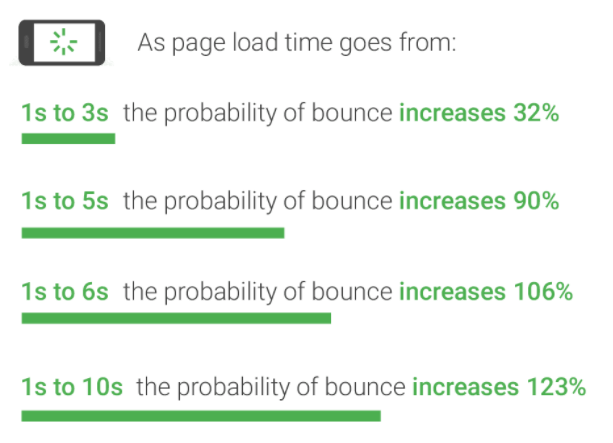
It’s clear to see that no matter what, faster is better and less is more.
Slow load times, whether on mobile or desktop, affect both your conversion rate and your Google rankings. Page speed is one of the signals that Google looks at when determining which pages rank for a given term, especially for mobile.
So what ARE the Core Web Vitals metrics, anyway?
Specifically, Core Web Vitals is a set of 3 key metrics related to page load performance:
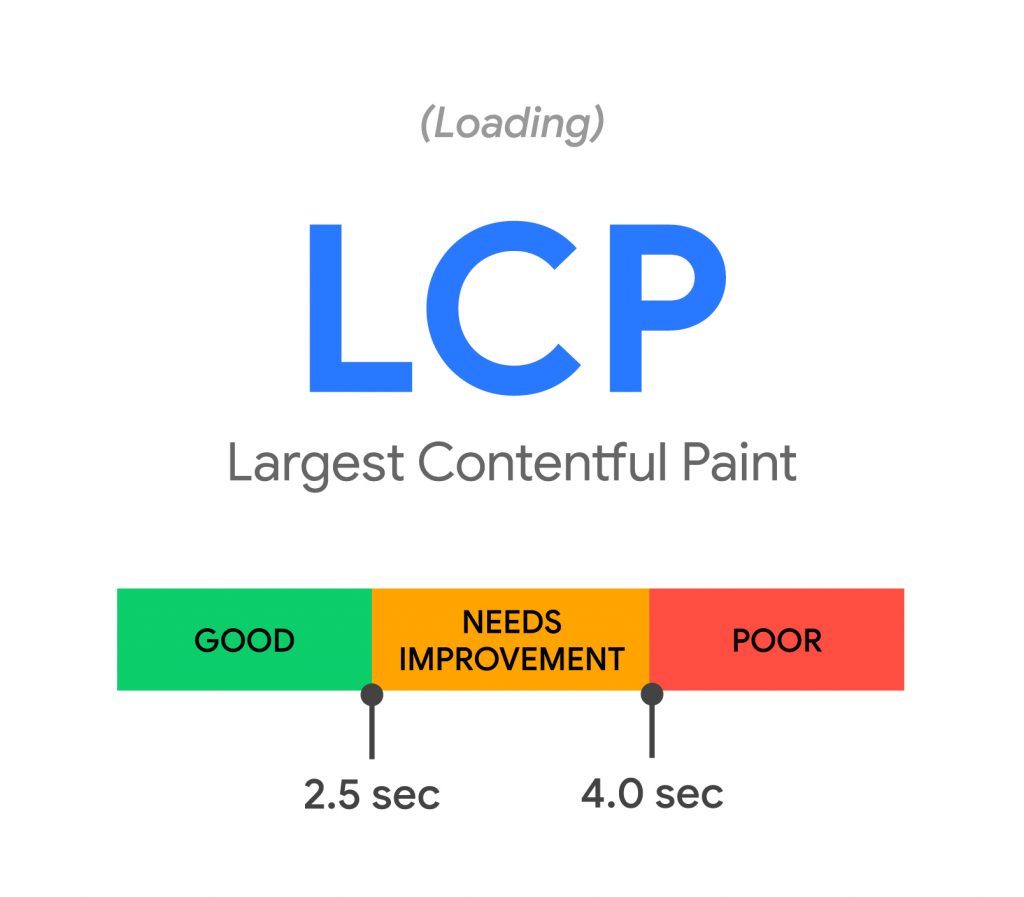
Largest Contentful Paint (LCP): A measure of the page’s loading performance in seconds (lower is better).
In other words: How long does it take for a user to start seeing what looks like a fully loaded page?
Google wants to see LCP below 4sec and prefers LCP below 2.5sec.
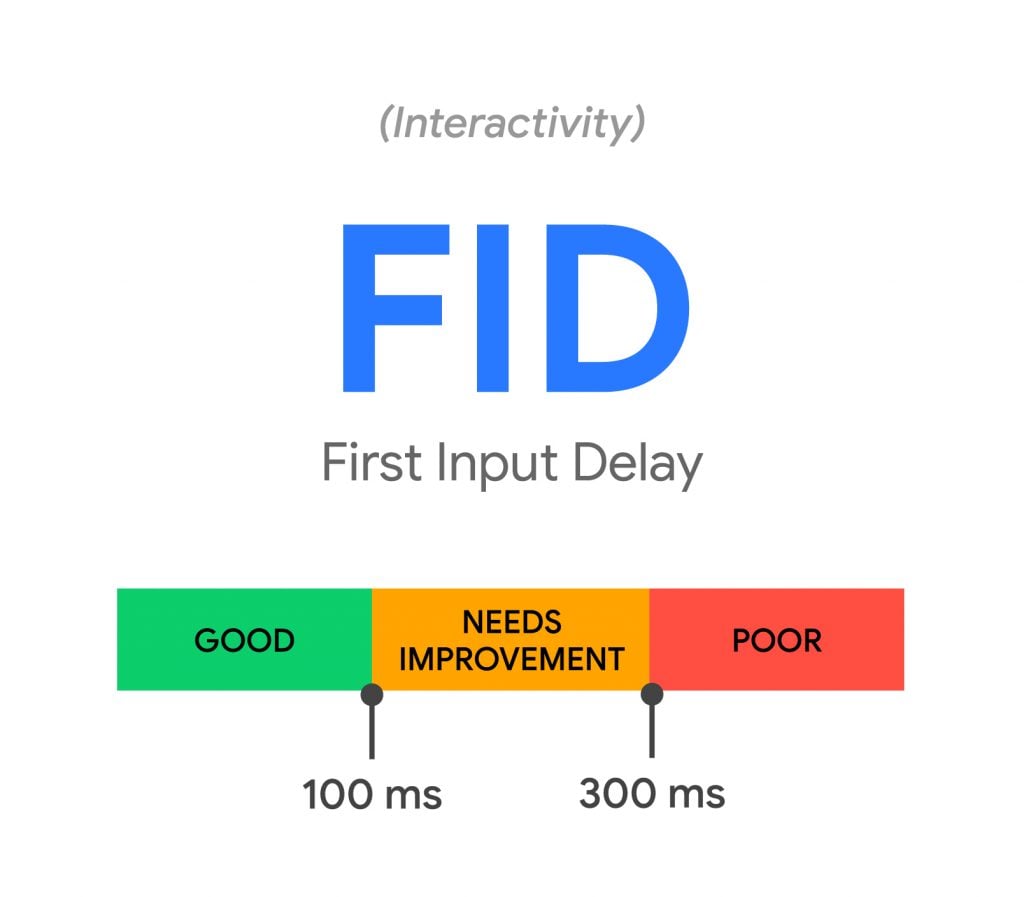
First Input Delay (FID): A measure of the page’s interactivity in milliseconds (lower is better).
In other words: How much time passes before a user can actually interact with a page (such as button clicks and scrolling)?
Google wants to see FID below 300ms and prefers FID below 100ms.
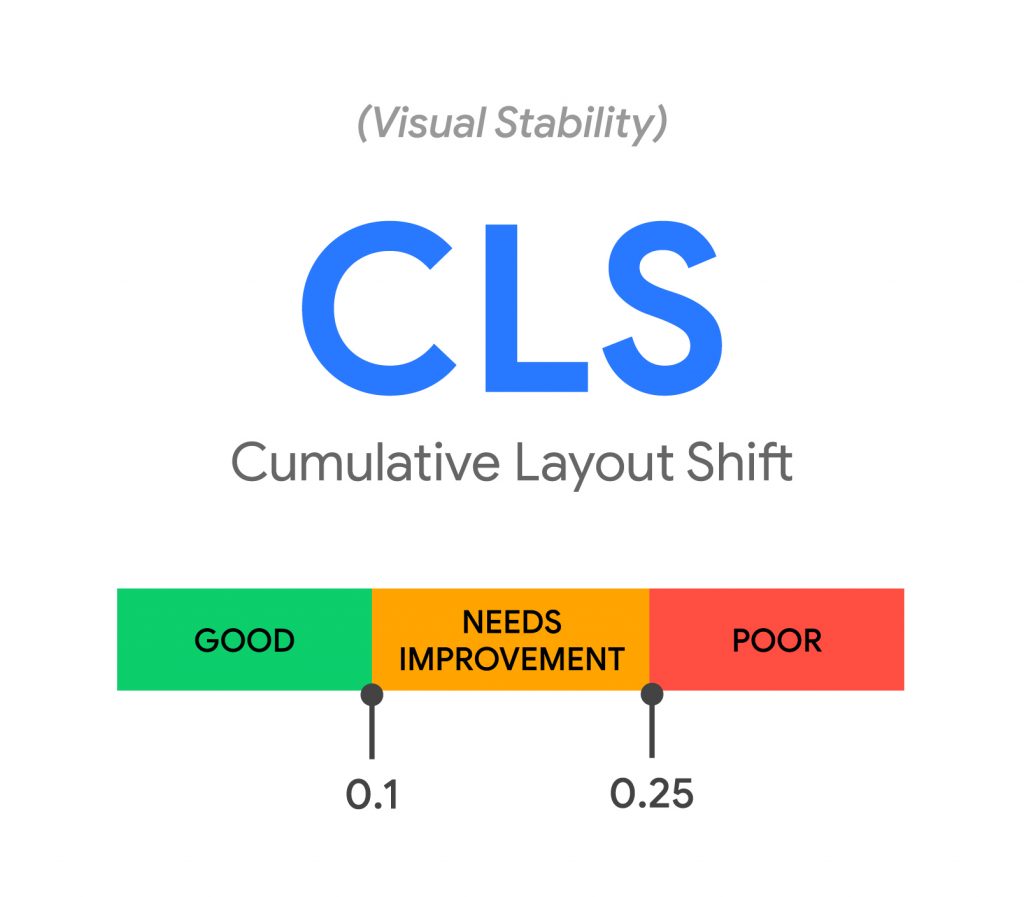
Cumulative Layout Shift (CLS): A measure of the page’s visual stability on a scale of 0 to 1 (lower is better).
In other words: Do elements of the page move (or shift) as a user traverses through the page? I’m sure we’ve all been on web pages where content is abruptly pushed out of view when reading or where a button you’re trying to click moves just before you actually make the click.
Google wants to see CSL scores below 0.25 and prefers CLS scores below 0.1.
How can you take your page’s pulse?
I’m advising all my clients, and basically, anyone who will listen to me, to run, don’t walk to check your core web vitals via the PageSpeed Insights tool to find out where your site currently stands.
Entering a URL and hitting “Analyze” will quickly get you a detailed picture of what’s slowing that web page based partly on these parameters, complete with recommendations on how to fix it.
- Parameter 1: Time to above-the-fold load. This is the amount of time it takes for a page to display content above the fold after a user requests a new page.
- Parameter 2: Time to full page load. This is the amount of time it takes a browser to fully render a page after a user requests it.
It works, according to Google, like this:
Page Speed Insights measures the performance of a page for mobile devices and desktop devices. It fetches the URL twice, once with a mobile user-agent, and once with a desktop-user agent.
The PageSpeed Insights Score ranges from 0 to 100 points, with color coding for different performance ranges. A higher score is better and a score of 90 or above indicates that the page is performing well (and shows a green color). Scores between 50 and 89 indicate room for improvement (and shows a yellow color). Scores 49 and below are considered “poor” (and shows a red color).
If your site is green, you’re in the clear. If it’s in the red, it means your page has some glaring loading issues.
What to do?
What may be the easiest way to boost your PageSpeed Insights’ score has nothing to do with writing a jazzy new headline or changing the font on your CTA button. Instead, you’ve got to start delivering a better user experience with faster, more stable page loads.
Your woes could stem from anything from a suboptimal bargain web host, “heavy” image-laden pages, to render-blocking javascript.
If it’s broke, fix it
The truth is, you shouldn’t be fixing your site just so it ranks on the first page–remember, optimal user experience is the holy grail of any online business’s sustained success. In that regard, Google is not doing you a disservice by calling attention to this critical issue.
If this post is elevating your blood pressure and all you want to do is focus on your business and not get bogged down with the endless curveballs Google has in store for you, rest assured that these issues can all be addressed. If you want to make sure your site is mobile-optimized and your PageSpeed Insights scores are in the “green zone,” hiring an SEO expert can add exponential value to your business, and help you sleep at night. It just so happens… I know a guy.