Browsing articles from "February, 2007"

Is your site unfriendly to search engine spiders like MSNBot?
Feb 26, 2007   //   by Stephan Spencer   //   Search Engines  //  No Comments

Microsoft blogger Eytan Seidman on their MSN Search blog offers some very useful specifics on what makes a site crawler unfriendly, particularly to MSNBot:

An example of a page that might look “unfriendly” to a crawler is one that looks like this: http://www.somesite.com/info/default.aspx?view=22&tab=9&pcid=81-A4-76&section=848&origin=msnsearch&cookie=false….URL’s with many (definitely more than 5) query parameters have a very low chance of ever being crawled….If we need to traverse through eight pages on your site before finding leaf pages that nobody but yourself points to, MSNBot might choose not to go that far. This is why many people recommend creating a site map and we would as well.

Podcasts on Business Blogging and SEO

Feb 26, 2007   //   by Stephan Spencer   //   Blogging, Search Engines  //  1 Comment

A few weeks back I posted a couple of podcasts from the Professional Association of Innkeepers International Conference 2006. At that Conference I spoke at four different sessions. The two sessions I already posted were on email marketing — one on the fundamentals and the other on advanced topics.

Now I have my other two sessions available for download:

* Blogging and Business: Powerpoint and audio

* Search Engine Optimization: Powerpoint and audio.

Bear in mind that these sessions were targeted more towards novices than advanced Internet marketers, but hopefully you’ll get something out of these regardless of your competency level. Any feedback you have is welcome.

Beating the Google Sandbox (TrustBox)

Feb 22, 2007   //   by Stephan Spencer   //   Search Engines  //  No Comments

My latest SEO Report Card addresses the mythical monster that continues to rear its ugly head… the “Google Sandbox.” No I’m not going to get into a debate about whether it exists or not. It does. End of discussion. :-) What I am going to do is try to render some assistance to some nice folks selling fair trade products online, Two Hands Worldshop. It touches a soft spot for me that they care about the raw deal that overseas workers get — those who make our clothes, shoes, toys, furniture, electronics etc. They started a business to promote commerce based on fair trade. Good for them! Maybe you, dear reader, might find it in your heart to help them too. Give ‘em a link! That’ll help them get out of the ‘box sooner. Plus all the meaty advice I gave them in my article “Escaping the Google Sandbox: New sites face same issues as Twohandsworldshop.com” will help too. They’ve already begun implementing the advice — like 301 redirecting www.twohandsworldshop.com to twohandsworldshop.com — and my article just came out. How cool is that!

Editing Wikipedia for SEO?

Feb 21, 2007   //   by Stephan Spencer   //   Search Engines, Wikis  //  10 Comments

It’s getting a bit ridiculous how often Wikipedia shows up on the first page of Google for just about every search imaginable. Micropersuasion has noticed it for brand searches. Google’s getting a bit lazy I think to give Wikipedia carte blanche access to page 1 of the SERPs (Search Engine Results Pages). Often times Wikipedia doesn’t deserve to be there (like when it’s only a stub, for instance).

But because Wikipedia does dominate the SERPs, it makes it pretty darned important for your company to have a good, balanced, accurate entry in Wikipedia. Not a stub. Not conspiracy theories written by crackpots.

Do you know what your Wikipedia page says about you? Better check it now:


Do you have all the “External Links” you deserve on that page? For example, I see on REI’s entry there is no link to their REI-Outlet.com site, or to their REI Adventures site either. That’s a missed opportunity — both in terms of clicks and in terms of PageRank. Here’s another example… on the Budget Group entry, I don’t see a link to their Budget Truck Rental site at Budgettruck.com. When adding links, contribute other things too in the same edit, such as fixing typos, adding additional copy etc. That makes it less likely your changes will be reverted. External link only edits are looked on with suspicion, and rightly so, since most of those are spam.

Don’t have a Wikipedia entry for your company? Then work towards getting one — assuming you’re noteworthy. (Don’t just add your company’s entry yourself, as it’s against Wikipedia’s NPOV guidelines.) Why is it good to have one? Because it’s a lot easier to get internal links from other entries to your own. External Links are anathema to many Wikipedia editors. They much prefer internal links.

Because External Links are so hard to add (at least to make them stick, for longer than 5 minutes before Wikipedians delete them), try adding References. References are desperately sought after by Wikipedia editors. Indeed, many entries are flagged to display a big message at the top that “This article or section does not cite its references or sources. Please help improve this article by introducing appropriate citations.” So help out: add some references that back up assertions made in the entry, some of which could happen to be articles on your site (assuming they’re relevant and add value to the entry). And of course you need to make your References links. Don’t only add References linking to your own stuff, as that looks just a wee bit self-serving — it will stick out like a sore thumb and your References will get nuked.

Surprisingly, despite the fact that anyone can edit anything, and can do it quickly and easily, Wikipedia maintains a high level of quality and accuracy. A study published in the academic journal Nature concluded that it is “nearly as accurate” as Encyclopaedia Britannica! That boggles the mind.

BTW, anyone notice how lousy Wikipedia’s internal search engine is? Try searching for “recreational equipment inc” for example. Oops, “No page with that title exists”! Doh, you forgot to include the dot! ;-) Try “recreational equipment inc.” instead and then it works. Ugh. SLI Systems, you guys should donate your “Learning Search” to Wikipedia. They need it bad.

Wikipedia changes the game, but the game isn’t over

Feb 21, 2007   //   by Stephan Spencer   //   Search Engines, Wikis  //  3 Comments

I blogged last month about Wikipedia and SEO. There are a number of considerations when making edits, creating entries, and passing the “Notability” test — practices to avoid so you don’t run afoul of their guidelines and so on.

Well folks, the game has changed. Wikipedia just instituted nofollows on all external links. This had already been in place for a while on some of their sister sites. This effectively removes a lot of the incentive to contribute to Wikipedia. Or does it? It does if your end goal is receiving PageRank to your own sites. But not if your goals are traffic (a top ranking Wikipedia page that links to you will still drive plenty of direct clickthrough traffic your way), credibility (companies with entries give the impression of being bigger and more legitimate), and reputation management (because a favorable Wikipedia entry for your company will probably occupy a spot in the top 10 in the SERPs for searches on your company name).

So are legitimate SEOs going to give up on contributing to Wikipedia? I hope not — at least for the ones who are adding value to Wikipedia. I think we’d all like the spammers to leave (I certainly would!), and I know that is Jimbo Wales’ intention, but I doubt that’s what will transpire. Nofollowing blog comments didn’t drive the spammers away; I can’t see it working for Wikipedia. Especially as long as Wikipedia holds the top spot for important keywords such as “marketing” in Google. (sigh!)

More discussion on this development at SEOMoz.

Link building into “Blog Carnivals”

Feb 20, 2007   //   by Stephan Spencer   //   Blogging, Online PR, Search Engines  //  1 Comment

You may or may not have heard of a blog carnival. Blogging colleague Toby Bloomberg first introduced me to the concept and I must say, as a link building afficionado, my eyes lit up at the potential these traveling columns have for building links.

A blog carnival is, in effect, a column on a particular topic that is passed on from blog to blog, with each blogger adding their own thoughts or findings to that topic.

If you have expertise, for example, in nonprofit marketing, you can join the Carnival of Nonprofit Consultants. There you will find other members of the nonprofit blog carnival adding posts on this specialty topic.

Think of the potential. By participating as a host (dare I say, carny?), all the other host members of the blog carnival will link to you.

Each issue/edition will link to a handful of blogs and sites as well, so if you have something useful and intelligent to say on the topic, you should submit your link for consideration by the host(s). And even if you don’t actively participate, it’s good to get on the radar of those contributing to it. You never know, they may see one of your articles or blog posts and discuss it within the carnival. Just by reaching out you may see your site mentioned as a useful resource. Now that’s potential.

Getting organized – a progress report

Feb 15, 2007   //   by Stephan Spencer   //   General  //  3 Comments

On January 1st on the MarketingProfs’ Daily Fix where I am a contributing blogger, I proclaimed my New Year’s Resolution to the world — which was to implement an amazing system for unprecedented gains in productivity and organization that I had discovered. That system — called GTD by its followers — is based on the best-selling book Getting Things Done by David Allen. With GTD, you stop using your brain as a holding tank for all the important things that you need to do and remember, so that you can be in the state of flow — what Allen calls “Mind like water.”

Sound pretty good eh? Well it is. But it’s no quick fix; it can take years to really master GTD. There are new processes to learn and old habits to break. It’s easy to “fall off the wagon,” so to speak, but it’s equally as easy to get back on it. To learn more about what GTD can offer, have a read of my MarketingProfs article from a couple weeks ago: Clearing the Clutter – How Busy Marketers Can Get Things Done.

My biggest accomplishment was getting everything and into one place — into a program called Journler (for the Mac). Trying to keep track of, and make sense of, the cacophony — the ideas and to do’s floating around in my head, the half-written email drafts, the Word documents, scribbled notes on Post-Its and backs of envelopes — that was fighting for my attention made me feel ‘out of control’ and caused me a lot of stress. I’m glad to be out of that. Now that I have a central repository to turn to, I’m never going back to my old way of recording things!

Allen’s “two minute rule” has been a big time-saver and sanity saver. The rule says: “If it can be done in 2 minutes or less, then just do it right then and there rather than defering it to later.” I used to touch the same email over and over again, even though it would have been a less than two-minute task to deal with it. What a time killer that was! I don’t do that quite so much any more.

One thing I haven’t totally licked yet is my overflowing email inbox. That’s next on my list. Allen advises maintaining an “Inbox Zero” state. I’m reading Merlin Mann’s excellent article series on the topic, which is giving me some great tips and tools. I can’t wait to learn how to do “email triage.” Mann claims anyone can clear their inbox in less than 20 minutes using the approach he outlines.

I’m still struggling with (learning about) managing projects with GTD. Even “Next Actions” are giving me some trouble. Next Actions are easy to manage when you have a manageable number. However I currently have 134 Next Actions. Probably that’s too many and I should move some into “Someday/Maybe”. With so many, even filtering those by context (e.g. “Errands”, “Calls”, “Writing”) still leaves me with an overwhelming list.

With that said, being able to view these to do’s by context has made me more efficient, because it empowers me to do stuff in batches, such as phone calls when I’m in a phone mood or when I have dead time while in the car or sitting in a waiting room.

Also, having a “Waiting For” list has freed my mind a bit because I don’t have to retain the fact that certain people owe me responses or deliverables. I simply review my Waiting For list, which triggers me to send out reminder emails to people who still owe me stuff.

So, there you have it. Far from perfect, and only scratching the surface of GTD, but it’s a start and I’m certainly better off than I was last year because of it. Overall I’m pretty pleased with my progress.

Any of you, dear readers, using GTD? Or thinking about it?

Free archived webinar on link building from me and Eric Ward

Feb 13, 2007   //   by Stephan Spencer   //   Search Engines  //  No Comments

I got permission from MarketingProfs to post an archived version of the webinar Eric Ward and I presented last year on link building. It is 90 minutes long and has some good actionable advice and tips and tricks, and it looks at link building from a more wholistic perspective than just SEO. I hope you enjoy it.

Check it out

Reverse engineering webspam

Feb 9, 2007   //   by Stephan Spencer   //   Search Engines  //  No Comments

I always enjoy ranting about the dangers of black hat SEO. Gray hat SEO too, for that matter. But what I enjoy most is the challenge of disecting sites that are using black or grey hat SEO techniques (Fresh Pair, for example) and peeling away the layers of the onion. I feel like a detective… like Robert Langdon (from the Da Vinci Code) trying to piece together a complex puzzle. The part of the sleuthing that I find the most challenging and the most satisfying is uncovering sophisticated link schemes — from aggressive link buying like what Fresh Pair and H&R Block are doing, to the most egregious spammers who obscure their ill-gotten links through cloaking and sneaky redirects. I recall back in 2004 figuring out that Findgiftcards.com was funneling link gain to their network of sites from legit sites using their free hit counter hosted at 123counters.com as the vector. That hit counter spread their spam by embedding keyword-rich links underneath the hit counter in the HTML code that the webmaster was supposed to copy-and-paste. Wow, that was like a scavenger hunt! I wrote about that one in Catalog Age. Funny, it wasn’t long after that they disappeared from Google. ;-) Immediately prior to that they were #1 for “gift certificates.” Oops, sorry guys! :-D

If “deconstructing” sophisticated search engine spam doesn’t sound like fun to you, then you probably won’t appreciate the blast I had reverse engineering As-Seen-on-TV-Store-1.com last year in my sixth installment of my SEO Report Card column for Practical Ecommerce magazine. This black hatter had no idea my published critique was coming; I’m sure they didn’t appreciate me airing their dirty laundry in public! But the sins of others can serve as a great teacher.

That affiliate site was a house of cards ready to fall. Here are a couple of the reasons why (I elaborate more in my full article)…

These guys have inbound links and link text — in spades! Yahoo! Site Explorer reveals over 6,500 inlinks to the site, excluding internal links. These links include some very reputable sites such as unesco.org/wfeo. Often times the link text is great too — full of keywords. But the linking sites aren’t relevant. Upon closer inspection, the links have been obtained by duping webmasters into posting a hit counter (e.g. from freestatscounter.com, freehitcounters.net, etc.) that contains links to doorway pages. (Hmm… sounds familiar, eh!)

“But wait, there’s more!” (I’m using my infomercial voice while saying that!) — a veritable minefield of bogus feedbacks, link farming, spam blogs (splogs), and doorway pages that have lost link popularity. 

For the rest of the findings, read the full article. Now. I promise you’ll like it!

Tricks for viewing cloaked content

Feb 7, 2007   //   by Stephan Spencer   //   Search Engines  //  3 Comments

There are two types of cloaking: user-agent based and IP based (also known by the euphamism “IP delivery”). Cloakers try to cover their tracks by making it difficult to examine the version meant only for spiders. They do this with a “noarchive” command embedded within the meta tags. Googlebot will obey that directive and not archive the page, which then causes the “Cached” link in that page’s search listing to disappear.

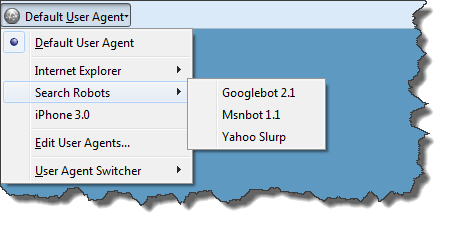
So getting a view behind the curtain to see what is being served to the spider can be a bit tricky. If the type of cloaking is solely user-agent based, you can use the User Agent Switcher extension for Firefox. Just create the following user-agent under Tools > User Agent Switcher > Options > Options > User Agents:

Description: Googlebot
User Agent: Googlebot/2.1 (+http://www.googlebot.com/bot.html)

Then switch to that user agent by selecting Googlebot under Tools > User Agent Switcher.

But that won’t work if the cloaker is doing IP delivery. If there’s no “Cached” link in the SERPs, you might think you’re out of luck. But you may not be!

A lot of times, Google’s “Translate This Page” functionality can be used to view the cloaked content, because many cloakers don’t bother to differentiate between the bot coming in for the purpose of translating or coming in for the purpose of crawling. Either way, it uses the same range of Google IP addresses. Thus, when a cloaker is doing IP delivery they tend to serve up the Googlebot-only version of the page to the Translate tool. This loophole can be plugged, but many cloakers miss this.

And I bet you didn’t know that you can actually set the Translation language to English even if the source document is in English! You simply set it in the URL, like so:

http://translate.google.com/translate?hl=en&sl=en&u=URL&sa=X&oi=translate&resnum=9&ct=result

(Above, replace URL with the actual URL of the page you want to view)

That way, when you are reviewing someone’s cloaked page, you can see the page in English instead of having to see the page in a foreign language. 

You can also sometimes use this trick to view paid content. i.e. if you’re too cheap to pay for content from sites like WebmasterWorld where that content has been placed behind a registration wall and removed from Google’s cache.

Example

Do pay for WebmasterWorld, though. Do right by Brett.

Pages:12»