This article was originally published under Search Engine Land.
In this era of Web 2.0, it seems that blogs, mash-ups, RSS feeds, and wikis have been the buzzwords occupying most of the limelight. But personally, tagging is the Web 2.0 technology that excites me the most, because of its versatility and wide applicability.
A tag, according to Wikipedia, is “a (relevant) keyword or term associated with or assigned to a piece of information (e.g. a picture, article, or video clip), thus describing the item and enabling keyword-based classification of information.” More simply put (with due credit to Flickr.com): tags are like keyword or category labels, and they can help visitors find items which have something in common.
With tagging, items are cataloged and organized by keyword. Those keywords can then be displayed as navigation using what’s called a “tag cloud.” In a tag cloud, the font size of each keyword is proportionate to the number of times that keyword has been used as a tag. In other words, the more items a tag has been associated with, the larger the font size. Tag clouds were first popularized on Flickr, the photo sharing website. The social bookmarking site del.icio.us further popularized tag clouds (see example below). A tag cloud provides web visitors with a quick visual indication of what tags are most popular on a site. It’s a new, more intuitive way to navigate an extensive collection of content and find information. A tag cloud makes your website look very Web 2.0ish (if that’s a word?).
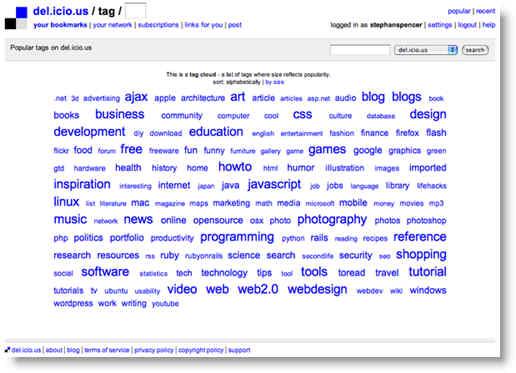
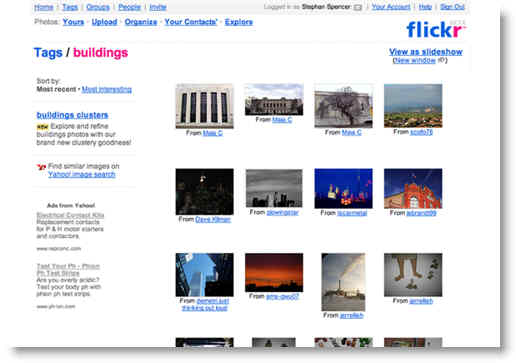
Clicking on a tag in a tag cloud leads the visitor to a “tag page.” A tag page contains a collection of the most recent items that have been tagged with the particular keyword (see example below). Tag clouds aren’t the only way to navigate to a tag page. Typically, an item’s tags will be displayed adjacent to the item, with each tag linking to its tag page. Also, once on a tag page, you can often find links to other tag pages through a list of “Related tags.” A tag is related to another tag if there are items that have the tag in common.
Tagging isn’t just a tool for usability (even though it’s typically mostly thought of in those terms), it’s also a powerful weapon for search engine optimization. That’s because tagging allows you to rejig your internal hierarchical linking structure, flowing the link juice more strategically throughout your site. And because those links are textual and keyword-rich, a tag cloud is far superior in terms of SEO to the traditional graphical navigation bar.
When tagging is applied to a website, such as a blog, it can significantly increase the site’s traffic by achieving visibility for a much larger array of search terms. Consider, for example, the case of my own personal blog, StephanSpencer.com: simply by tagging one of my posts with the keyword “blog optimization,” I received a top 10 ranking in Google for the query “blog optimization” — within only a few weeks and without any additional effort. It was a tag page that achieved the high ranking for me, and it was created automatically the first time I used the tag. (Note: I use WordPress, which now, as of version 2.3, has tagging built in.) A tag page, by its very nature, is designed to have its tag as its keyword focus. So, simply select a relevant keyword to rank for when coming up with tags for your content, and presto! — instant rankings.
Tagging is particularly effective at delivering Long Tail search traffic when the site offers “tag conjunction pages.” Although the various obscure Long Tail search terms may be searched on by only a few people, in aggregate, they can really add up to a sizable amount of traffic. Tag conjunction pages are created automatically by the fact that there are multiple posts with two tags in common. On my blog, the links to tag conjunction pages are displayed in the right column of my tag pages underneath the section “Related Tags” (see my “blog optimization” tag page for an example). You will see that each “Related tag” is preceded with an “AND” and an “OR” link pointing to a tag conjunction page. By displaying links not just to the related tag pages but also to conjunctions between related tags, multitudes more pages are made available to the search engine spiders.
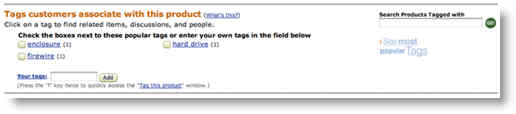
It should be noted that tagging is applicable not just to blogs, but all types of sites — ecommerce sites, content sites, even corporate sites. Probably the most well-known ecommerce site is Amazon.com, and it supports tagging. In fact it supports consumer-generated tagging.
Some sites allow tags to be defined by the community of visitors, not just the content author. Allowing your visitors to create the taxonomy of content items on your site by tagging your content (this is known as a “folksonomy”) may or may not be a good thing. It depends on how good of a job your visitors will do and how good your quality control systems are at stamping out spam and minimizing noise. Amazon.com’s tagging system has been plagued with useless tags like “betty’s birthday,” which really only has value for the tagger and no one else. Nonetheless, tagging seems to be working for Amazon; if it wasn’t, they would cease expanding upon their tagging functionality and probably discontinue offering it altogether. Another issue with letting visitors do the tagging is lack of consistency. Sometimes visitors will misspell words, sometimes they will add hyphenation, sometimes they will use obscure synonyms. Which brings me to another point: your visitors don’t know how to (and don’t care to) conduct keyword research — identifying popularity of various keywords by search engine users. They may, for instance, tag a product with “hard disk” when “hard drive” is the much more popular keyword with searchers. But what do you expect? After all, you’re getting free labor!
One corporate site where tagging has been utilized, to great effect, is my company’s website, — Netconcepts.com. Tagging was largely responsible for a more than doubling of pageviews — within two months. First, every testimonial, every portfolio entry, every press mention, as well as each bio, article, and case study, was broken out into a separate blog post. Then, each post was tagged with appropriate keywords. For example, all the testimonials were tagged with the word “Testimonials.” So instead of having a single testimonials page as we used to, we have a testimonials tag page that spans three web pages (at 10 posts per page) and each of the 30 testimonials is a separate web page now too. In other words, we went from 1 page to 33 pages; that’s a lot more search engine fodder, all with different keyword foci!
Spiders can find and index these tag pages through the text links contained within the tag cloud on the home page, through text links underneath each post, and through links to “Related Tags” on each tag page. Remember, Related Tags are determined from posts that have the tag (from the tag page in question) in common. So, for example, because we have posts that are tagged with both “Web Marketing” and “Testimonials,” “Web Marketing” then appears as a related tag on the Testimonials tag page and “Testimonials” appears as a related tag on the Web Marketing tag page. Let’s restate that a little bit differently just to clarify… All our web marketing related items (testimonials, case studies, etc.) were tagged with “Web Marketing.” Consequently, there is a tag page that relates to “Web Marketing” and a tag page that relates to “Testimonials.” Additionally, there’s a tag page that relates to “Web marketing testimonials” — the intersection of those two tags. That makes for a plethora of tag pages, considering how many different permutations there are for various combinations of tags being “ANDed” or “ORed” together. The result? Thousands of tag pages and tag conjunction pages indexed by Google, many of which are bringing in traffic, albeit individually in small amounts. For example, a tag conjunction page ranks well in Google for “web marketing testimonials,” though few search for that term. In all, the traffic increase from this initiative was substantial, as illustrated in the traffic graphs in the case study at www.netconcepts.com/netconcepts-case-study/.
Over time, look for tagging to become much more widespread across the Web. Until then, tagging presents a distinct competitive advantage, both in terms of search engine visibility and user experience.