This article was originally published under Search Engine Land.
Let’s deconstruct the Google snippet in all its glory — from the Posts/Authors/Last Post line, to the document date, to the Keywords in Context (“KWIC”), to the ellipses, to the inside-the-snippet anchor links.
But before we do, it would probably be a good idea to define the term snippet. Google defines a snippet as “a description of or an excerpt from the webpage” that follows the title and precedes the URL and Cached link. Simply put, the snippet refers to the description portion of a Google search listing. It doesn’t include the title, nor does it include the URL. Google engineer Matt Cutts provides a good introduction to snippets and the surrounding neighborhood in this video.
This is a crucially important detail: snippets are determined query-time; in other words, they vary depending on the keyword being searched on, as demonstrated by Wordstream’s blog post about snippet control here.
What are the components of a Google snippet?
First, there is sometimes a gray line of text that precedes everything else. If Google determines that the site is a discussion forum, you’ll see in gray text: “[number] posts – [number] authors – Last post: [some date]”, as you can see in the example below:

If it’s a scholarly article, then the gray text says something like “by J Smith – 2010” or “by J Smith – Cited by 1 – Related articles.” If a book result, then it’ll show something like “by J Smith – 2010 – Fiction – 333 pages.” If the page is marked up with microformats, the gray text may display structured data on people, locations, events, product ratings/reviews, etc. — this is referred to by Google as a rich snippet.
Rich snippets are relatively rare, so don’t expect that employing microformats will automatically trigger rich snippets. I expect this will change as Google continues to roll out their implementation of rich snippets. Rather than discuss rich snippets in detail here, I’ll point you to an article on the topic written by one of my colleagues here at Covario, Jill Kocher.
Then it switches to black text. Sometimes the snippet includes a date at the beginning followed by ellipses (“…”). That occurs if Google determines there is a primary date associated with the page in question, such as is often the case with a blog post. This does not hold true for blog category pages, because there are multiple posts listed, with a date associated with each.
Google is quite adept at teasing out the date from the page. It doesn’t have to be marked up with some special microformat. I’ve seen dates enclosed in div or span tags with a class name that is anything but standard (e.g. class=”date”, class=”submitted”, class=”posthead”, etc.). I’ve seen dates in dd tags with a label like “Post date” in a dt tag, or simply the words “Last modified:” preceding the date. I’ve even seen dates simply bare in the copy. Google correctly handled them all.
If there is no date but the snippet begins with ellipses, that indicates the snippet was excerpted from a larger body of text (whether part of a meta description or page copy — more on this in a minute) and text preceding the ellipses was omitted. Similarly, when ellipses follow at the end of the snippet, the snippet was truncated for length. The maximum length of a snippet (at least a standard snippet), not including ellipses at the beginning or end, is 156 characters. If the snippet source (e.g. the meta description) is any longer than 156 characters, the snippet will be truncated and ellipses will be displayed to mark where the text continues but was omitted in the snippet view.
Ellipses can occur at the beginning, and/or end, and/or somewhere in between once or multiple times. There is an exception to this 156 character rule: sometimes an extended snippet is displayed for certain listings, like when it’s a more esoteric query. Or, when the listing is buried deep in the search results, where the snippet spans 3 or even 4 lines in the search results instead of the standard 2 lines and thus there can be nearly double the number of characters present (as in the screenshot above.)

How to influence snippet text to use a Meta description
The copy in black text could be pulled from one or multiple of these sources: from the meta description, from the description from the site’s Open Directory listing, from the content of the page body, or even a combination of these. I’ve seen cases where the meta description and body copy were both incorporated into the snippet.
Surprisingly, even hidden (“display:none”) text can end up in the snippet. Rather than leaving your snippet to chance, try to “convince” the Google algorithm to use your meta description instead (assuming it’s good, i.e. is well-written and compels the click through, of course!) by incorporating the popular search terms in the meta description.
It’s most likely that the meta description will be used by default when the page doesn’t contain the user’s search term and is ranking primarily because of inbound links and their anchor text. Here’s a (perhaps obvious) tip: look at your web analytics for the top search terms driving traffic to the page and make sure these terms are present in that page’s meta description.
Meta descriptions are best hand-crafted, but for a large website, that’s probably impractical. Thankfully, meta descriptions generated automatically based on a recipe can work out well too. For example, an etailer could auto-generate meta descriptions for their product pages whereby all the key bits of information which are scattered throughout the page (e.g. price, size, style, manufacturer) would be gathered together — since it would otherwise be unlikely that a Google-generated snippet would capture all of this information.
According to this Google Webmaster Central Blog post, the meta description is less likely to be used if Google’s automated algorithm deems it low quality. What would cause Google to deem a meta description low quality? If it’s comprised of long strings of keywords, duplication of information that is already in the title tag, content duplication within the meta description itself, or poor formatting that makes the description hard to read.
An Open Directory listing, if you have one, will probably trump your meta description and page copy for your home page. For example, search for “starbucks” and you’ll find the Starbucks.com home page listing has this 1-line snippet: “International chain. Offers store locator, menu, and product information.”
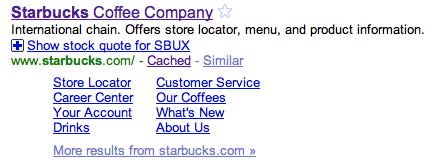
This is the description from the listing for Starbucks in the Open Directory. Despite the fact that the meta description (“Starbucks.com home page”) includes the search term (in this case “starbucks”) and the ODP description doesn’t, the latter is what is chosen for the snippet. If you don’t want your ODP listing to be the basis for your title or snippet, use the meta robots NOODP tag, as explained here.
Search snippets and “Key Words in Context”
Within the black text, you will often see bolded keywords. The bolded words correspond to the search keywords entered by the user. The bolding is referred to by Google engineers in information retrieval (IR) parlance as Keywords in Context, more often by its acronym KWIC. Matt Cutts talks about KWIC (pronounced “quick”) in this video.
Google uses stemming, morphology, and synonyms to relate the searcher’s keywords to the keywords in the document. A different gerund (-ing instead of -ed) could be considered a match by Google’s relevancy algorithm, but it may or may not be bolded as a keyword in context. Doing my own tests, I found cases where queries in a singular form returned plural forms of keywords in bold, and vice versa.
Additional snippet features
After the line(s) of black text, there may be a “plus box.” The plus box could, for instance, be with a stock chart for a publicly traded company’s home page listing. Or a map of a pertinent location if Google was able to extract a primary address from the page.
Sitelinks also may be present after the black text. Sitelinks are not traditionally considered to be part of the snippet. Sitelinks in their standard form point to other locations within the site using text obtained from anchor text or title tags. But there are now anchor-based sitelinks too that point to locations within the same page (when links containing # are present on the page.)
Sitelinks will sometimes be present within the snippet itself (read about this “Jump to” feature here). Strangest of all, the anchor sitelinks is the one that is sometimes attached to forums, detailed at the end of this post. Sitelinks are beyond the scope of this article; I’ll save that for another time. In the meantime, check out this article from one of my New Zealand-based colleagues to learn more about Google’s criteria for displaying sitelinks and how to influence when and how they are displayed.
Occasionally, you may come across a search listing with no snippet. That can happen if the site goes offline or is otherwise not available, such as during a DDoS attack. A more likely scenario is if the page was disallowed by robots.txt. A Disallow directive tells Googlebot not to access the page, but it can still list it in the search results — even though it doesn’t know what is contained on that page. A No-follow directive on the other hand, which is also unofficially supported by Google, will keep the page out of the search results altogether.

5 myths about Google snippets
I’d like to take a moment to dispel several myths about snippets:
- The term snippet is synonymous with the search listing and therefore includes the title, URL, Cached link, etc. Not true. Google makes very clear the fact that the term snippet applies solely to the description — and therefore follows the title and precedes the URL and the Cached link.
- Google always uses the meta description in the snippet if it’s defined. That is far from the case. As already mentioned, snippets are query-specific and so they are always changing. Even when your meta description includes the search term, there are no guarantees.
- Meta descriptions help with rankings — not just the snippet. This is patently untrue. According to Google, “while accurate meta descriptions can improve clickthrough, they won’t affect your ranking within search results” (from this aforementioned post.)
- The bolded keywords in the search listing are bolded because they affected the ranking. Nope. The bolding of keywords (KWIC) is solely for user experience purposes. The meta description, as already stated directly above, does not influence a page’s rankings.
- The maximum length of a standard snippet is 160 characters. I’ve seen various SEO bloggers asserting max lengths of 150, 156, 160, 161, and 165. What’s the correct answer? As mentioned above, 156.
I love to see creative snippets. Here’s one of my favorites, from Darren Slatten’s home page (SEOmofo.com):
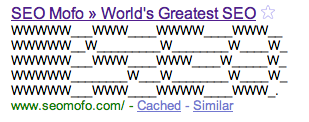
Speaking of Darren, I encourage you to check out these clever snippet experiments he conducted and his Snippet Optimizer tool. Another useful tool — this one from Google — is the Rich Snippets Testing Tool; just don’t get your hopes up that this means your listings will display with rich snippets anytime soon – unless of course, you’re the size of LinkedIn or Hulu.