Stephan Spencer's Scatterings

The Scattered Wisdom of a scientist turned web marketing virtuoso

November 2008
S M T W T F S
 << <   > >>
            1
2 3 4 5 6 7 8
9 10 11 12 13 14 15
16 17 18 19 20 21 22
23 24 25 26 27 28 29
30            

We've Googlized a client's home page!

I'm usually of the mind that home pages should be rich with textual content so the search engines have something to sink their teeth into. In most cases it's your home page that gets the most weight of all the pages of your site, so you don't want to squander that opportunity. However, there are (rare) exceptions to this -- times when another approach is in order -- where you strip away all but the most essential components (sometimes all the way down to just a search box).
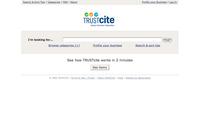
Trustcite.co.nz home page screenshotThis is referred to in some circles as "home page Googlization." Usability guru Jared Spool recently blogged about home page Googlization. I pretty much agree with his take on this subject. However, we felt that the homepage of our client TrustCite was an exception that warranted Googlizing. The design is very minimalistic. Have a look at it. For this site, simplicity and responsiveness was of primary importance, because the site is meant to become a frequently used resource for New Zealanders. Its singular purpose is to help Kiwis find reputable tradespeople and service providers by relying on feedback from the user's social network. The primary method of locating these suppliers is through the search box, although there are strong trigger words on the page tucked away under the "Browse categories [+]" link.

Other examples of sites where I think home page Googlization would be in order:

  • Wikipedia (rarely are any of the trivia featured on the home page of interest to me, and never has this filler content been what I went to Wikipedia for)
  • most bank homepages (all I care about as a customer is the online banking login form... take me to my money!)
Posted by Stephan Spencer on 06/15/2006 | Permalink

Comments (6)| Comments RSS | Filed under: Usability            

6 comments

  1. The page does look very clean and tidy, but you might want to check how businesses are categorised. I just searched on 'plumber' but it returned no results, even though I notice there are two 'plumbing' firms.

    Comment by Craig McGinty [Visitor] Email · http://www.thisfrenchlife.com/ — 06/15/06 @ 06:28


  2. Intersesting!

    Do you have screen shots from the old design? I'd love to see what this replaced.

    Did you do any testing with users on the new page? If so, how did they react?

    As for banking home pages, isn't that only true if you already have an account? What if you're thinking of switching to a new bank?

    Comment by Jared Spool [Visitor] Email · http://www.uie.com/brainsparks — 06/15/06 @ 07:25


  3. Hi Jared,

    It's a brand new site.

    No user testing... no room in the budget for it.

    You're right that a Googlized bank home page won't be all that satisfying to a prospective customer. But heck, we don't go shopping for a new bank all that often. Usually when we visit a bank site, it's as a customer. So I still say Googlize it! Especially the USBank.com homepage. Yuch... what a bloated, slow-loading, worthless page. They must have been confused on the difference between a homepage and a sitemap!

    Comment by Stephan Spencer [Member] Email — 06/16/06 @ 03:28


  4. Stephan,

    I think you're going to run into problems similar to what Craig is describing: Searching for 'plumber' doesn't return 'plumbing' and the like. Categories don't have this problem, as the human brain can make the transition easy.

    I recommend you watch users as soon as possible.

    Also, you might look at every query and see what the percentage of "no results" are. For every query that returns no results, see if it is something you have content for and build in a synonym. For a search like this, no results for known content should be close to 0%, certainly in the low single digits.

    I'd also be willing to bet that if you check your logs, less than 20% of users enter a second query if they don't find what they want on the first try. If I'm right, it means, for most users, you'll only get one chance for Search to work. That's a tall order.

    In the end, my prediction is your client will spend more on losing potential clients and/or tuning Search to work than it would've cost to do the user tests and discover users would prefer the categories.

    Just a hunch... :)

    Comment by Jared Spool [Visitor] Email · http://www.uie.com/brainsparks — 06/16/06 @ 06:43


  5. Hi Jared,

    The much bigger problem for TrustCite right now is they have very few profiles. So it's an empty site. Like an eBay without any auctions, it's pretty useless to users until TrustCite reaches a critical mass of member profiles. Most queries and many category clicks will return an empty results set. They are working really hard on partnerships etc. to grow their membership, but it's still early days. The site is very much "in beta" -- though, unlike Google, we hate to launch sites with "beta" plastered all over the site. ;-)

    We'll conduct some user tests, improve the internal search engine with synonym lookups, do some SEO work, etc. as soon as they've gotten some budget and give us the "Go" signal.

    Thanks for the feedback, and for taking an interest!

    Cheers,
    Stephan

    Comment by Stephan Spencer [Member] Email — 06/18/06 @ 14:58


  6. Focus group research many months before TRUSTcite was launched confirmed keyword searches, rather than browsing via categories, was the preferred option for TRUSTcite members as it gives them a perfect opportunity to be found in categories they may not traditionally be considered to service. For example, a keyword search using 'funeral' brings up Cambridge Funeral Services (category: funeral directors), Bubble Florist & Gifts (category: memorial products & services) and Norman Watson (category: marriage celebrants & funeral directors). Both the florist and Norman have the word 'funeral' in their profiles, hence they are returned in the search. If 'browse categories' had been used, four click-throughs would have been required to get to the same search outcome, and the florist would have been omitted completely.

    Initial TRUSTcite members have been overwhelmingly supportive of the emphasis on keyword searching and Beta testers acting as browsers are comparing the search functionality of TRUSTcite with Google – hence our focus on this. In fact, the 'browse categories' option is likely to disappear completely over time once more service providers are profiled, which will make the home page even more Googlised!

    TRUSTcite's key focus is not which category a provider is listed under (TRUSTcite is a search engine, not a directory), but which other professional people trust and recommend them and how many positive feedbacks they've received from past users. That's what puts a provider at the top of a search outcome.

    Comment by Hannah Samuel [Visitor] Email · http://www.trustcite.co.nz — 06/24/06 @ 20:53


Leave a comment


Your email address will not be revealed on this site.

Your URL will be displayed.
(Line breaks become <br />)
(Name, email & website)
(Allow users to contact you through a message form (your email will not be revealed.)